Help centerBank connections






Connect a bank with Plaid, and what gets imported
Connect a bank from Calendar Settings, choose the accounts to sync, and the calendar starts with their balance and the last 30 days of transactions.
You connect a bank through Plaid, a service that signs in to your bank for you. Cash Flow Calendar never sees your bank login.
Connect a bank
- Click the settings icon at the top of the calendar to open Calendar Settings.
- Under Accounts on this calendar, click Connect a bank.
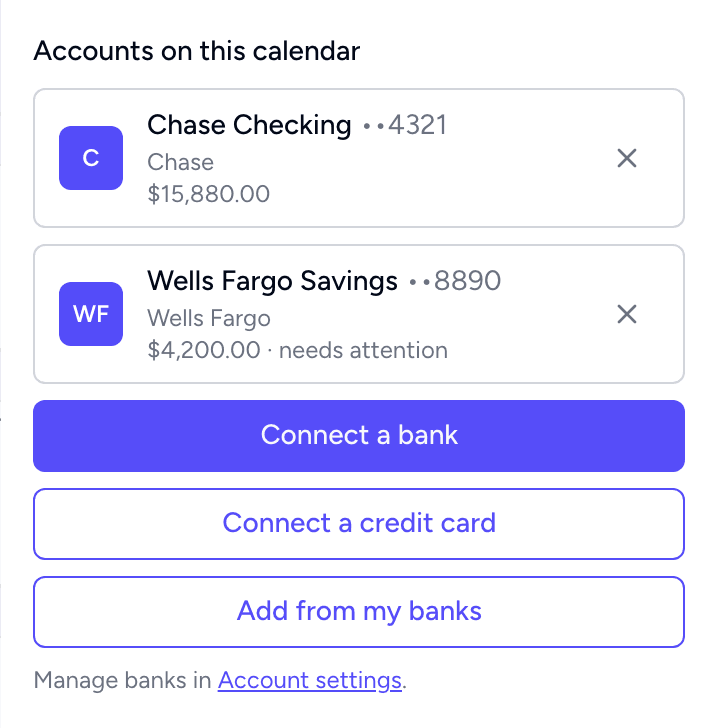
- Choose your bank in the Plaid window and sign in there.
- When the window titled Confirm the account(s) you want to sync opens, click each account you want.
- Click Link.
The accounts you chose are added to this calendar only. If we find bills or paychecks that repeat, a window titled Looks like these repeat lets you add them.
On mobile: tap the settings icon to open Calendar Settings, then tap Connect a bank. You can also open Account, then Banks, then tap Connect a bank. A bank connected there is on no calendar until you add its accounts in a calendar's settings.
Credit cards
Click Connect a credit card instead and pick the bank that issues the card. A card shows what you owe. It does not change your calendar balance.
Good to know
- The calendar's starting balance is the balance of the chosen accounts on the day you link. It is not recalculated later.
- Transactions from the 30 days before you link are imported. Older history is used only to spot repeating bills.
- New bank transactions usually appear within a day. Click Sync in the Banks section of your Account page to pull them in now.
- Banks in the US and Canada are supported.
- Already connected this bank? Use Add from my banks to add more accounts without signing in again.

