Help centerCalendar
Set up recurring transactions, including last day of month and end rules
Turn on Recurring in the transaction form, then pick how often it repeats, which day of the month it lands on, and when it stops.
WebiPhoneAndroid
A recurring transaction is one rule that repeats, like rent or a paycheck. You set the rule once and every date appears on the calendar.
Make a transaction repeat
- Click Add Event on the calendar, or click an existing transaction to edit it.
- Enter the name, amount and date. The date is where the series starts.
- Turn on Recurring. The form shows a sentence: "Repeats every 1 week".
- Change the number and the unit (day, week, month or year). "Every 2 weeks" is bi-weekly, "every 3 months" is quarterly.

The dates it lands on show below the sentence as "Next" pills.
Pick the day of the month
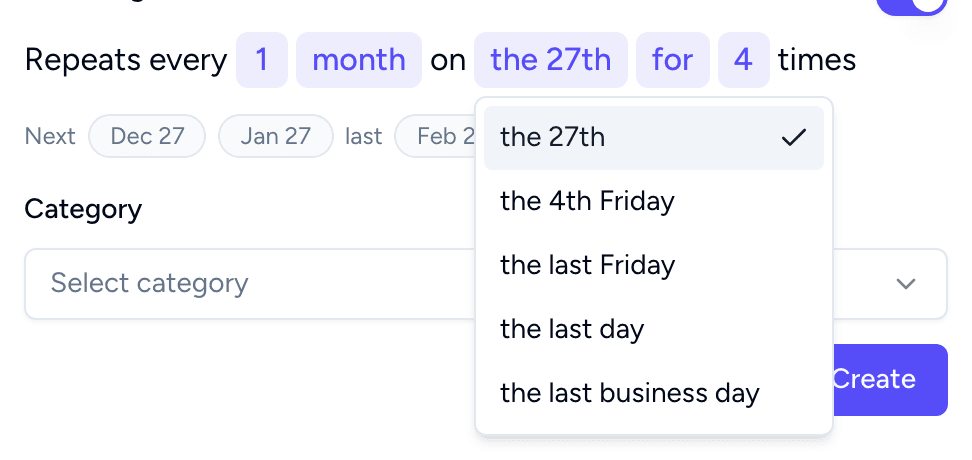
When the unit is month, the sentence adds "on" and a dropdown. It offers:
- the day of the month your date falls on, such as "the 10th"
- the weekday position, such as "the 2nd Thursday"
- the last day
- the last business day, the last weekday of the month
Choosing either last option moves your start date to that day.
Choose when it stops
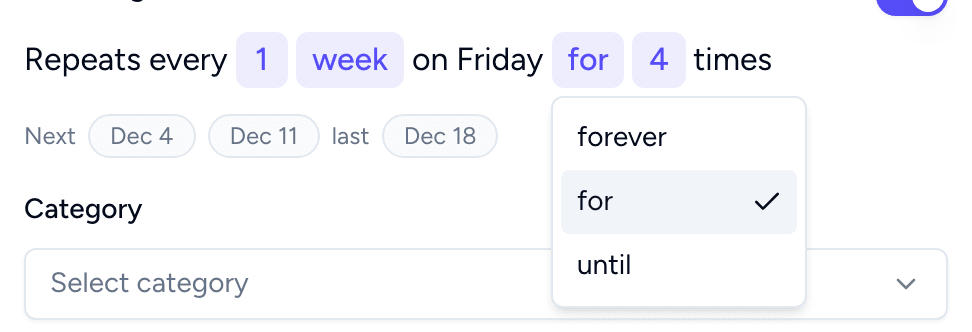
- Open the dropdown at the end of the sentence and choose forever, for or until.
- For for, type a number of times. For until, pick an end date.
- Click Create.
Good to know
- "For 4 times" counts the start date as the first one.
- A monthly series set to the 29th, 30th or 31st lands on the last day of shorter months.
- A yearly series started on February 29 skips years that have no February 29.
- A new series starts as weekly, for 4 times, so change the ending if you want it to continue.
- On mobile, tap where these steps say click. The form has the same sentence.

